Antigravity Usage Stats
ProductivityJun 2026Track Antigravity token quotas, model depletion, and daily API spending directly from your macOS menu bar.
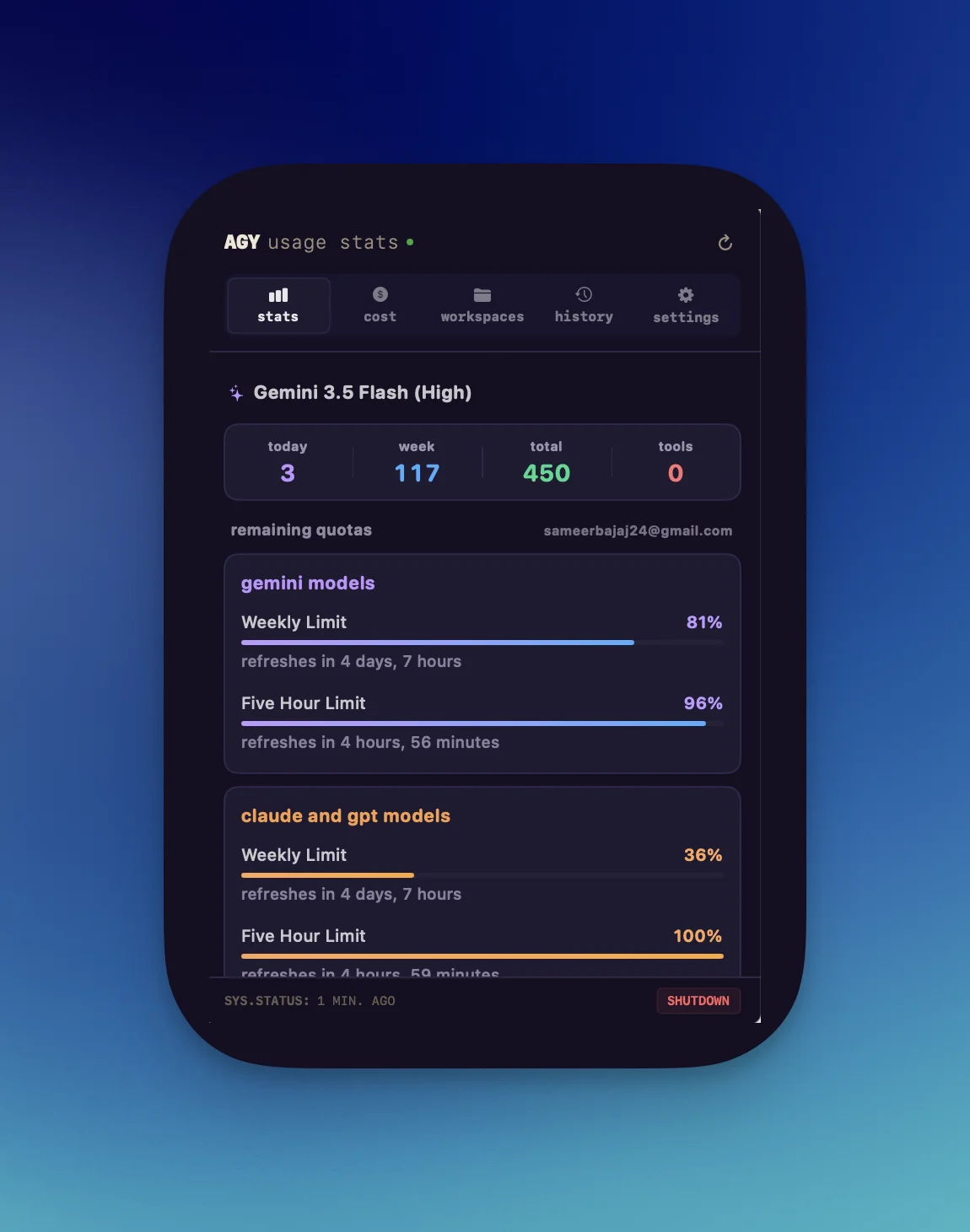
Why I built this
When running long coding workflows across multiple terminal sessions with the Antigravity CLI (agy), keeping track of rolling 5-hour quotas and API spending was painful. Checking how much headroom remained meant interrupting my work to run diagnostic commands or simply waiting until a query failed with a rate-limit error.
I built a native macOS menu bar monitor that displays real-time quota status without any polling overhead. It sits in the menu bar, shows the most constrained model limit, and tracks daily token expenditures locally.
Real-time quota monitoring and spend tracking
Antigravity Usage Stats gives you immediate visibility into your active CLI sessions, token consumption, and rate limits.
Checking rolling 5-hour quotas in the menu bar
A custom status icon renders a circular ring gauge with your remaining percentage number right in the menu bar. The gauge shifts color according to quota health: green above 50%, amber between 20% and 50%, and red at or below 20%.
Tracking model depletion across concurrent sessions
The app monitors whichever model is burning capacity fastest across concurrent terminal sessions (Argon, Sonnet 5.5, Opus 5.5, or Gemini 2.5) and reflects that model's limits in the primary gauge.
Managing personal quotas and Google Cloud direct billing
If you use both personal subscription quotas (~/.gemini/antigravity-cli) and Google Cloud direct billing (~/.agy-gcp-home), the app monitors both environments concurrently with an account switcher to filter metrics.
Calculating token spend and prompt cache discounts
A built-in cost engine estimates spending for frontier models, taking into account configured reasoning effort tiers and 95% prompt cache discounts.
Daily spend charts and usage history
Click the menu icon to inspect an interactive daily spend bar chart with peak-day callouts across 7-day, 30-day, and all-time windows.
Zero-overhead file watching with kqueue
The app uses macOS kqueue kernel file monitors on session history files with debounced 300ms updates and sub-millisecond in-memory caching. Idle CPU usage is 0.00%, with no network polling.
Hover tooltip for instant quota checks
Hovering over the menu icon brings up a summary of active models, quota percentages for Claude and Gemini, and today's total query count without opening the popover.
How to install
- Download the latest release DMG from GitHub Releases.
- Drag
agy-usage-stats.appinto your/Applicationsdirectory. - Launch the app. It automatically locates your local Antigravity CLI logs and starts displaying usage.
Local security and privacy
Antigravity Usage Stats operates entirely on device. It reads your local CLI log files and queries the language server daemon on localhost. No remote network calls are made, no telemetry is gathered, and no personal data ever leaves your computer.